![TW Blue Logo 230908a.png]](https://help.trakwell.ai/hs-fs/hubfs/TW%20Blue%20Logo%20230908a.png?width=126&height=17&name=TW%20Blue%20Logo%20230908a.png)
Table of Contents
The Home Page
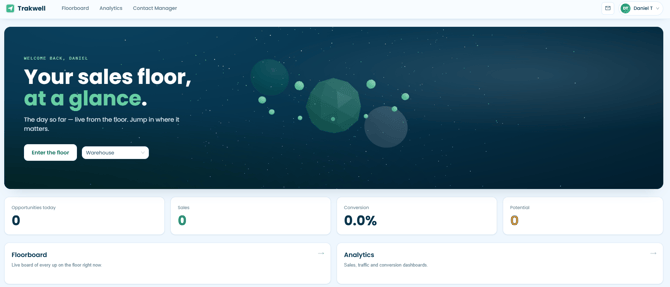
Once you log in to Trakwell, you'll land on the home page. This gives you a quick snapshot of your store's activity for the day, including:
- Opportunities today -- total customer interactions
- Sales -- number of sales recorded
- Conversion -- your store's conversion rate
- Potential -- number of potential sales in progress
Entering the Floorboard
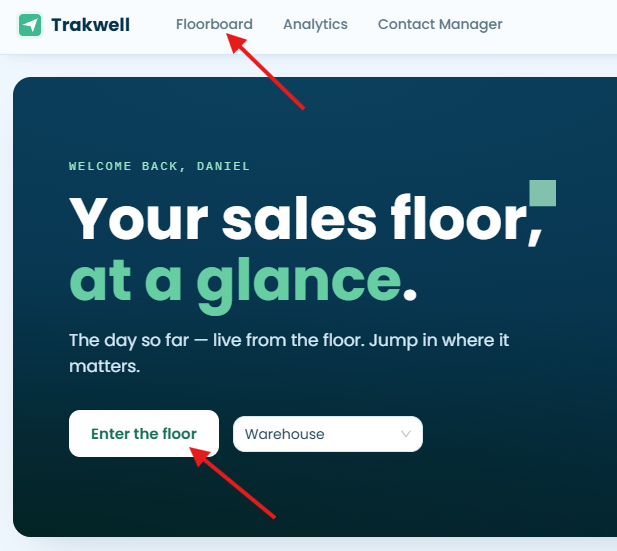
There are two ways to get to the Floorboard:
- Click the "Enter the floor" button on the home page
- Click "Floorboard" in the top navigation bar
Either way works -- you'll end up in the same place.
Joining the Rotation
The first time you log in each day, you'll be prompted with a "Join upboard?" message. This is asking whether you want to join your store's rotation for the day.
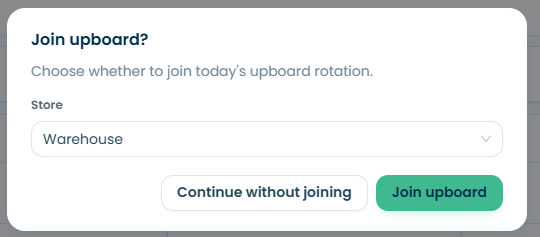
- Join upboard -- adds you to today's rotation so you can be assigned to customers
- Continue without joining -- takes you to the Floorboard without adding you to the rotation
If you log out and log back in during the same day, you won't be prompted again -- you'll go straight to the Floorboard.
Depending on your account permissions, you may have access to one store or multiple stores. Select the correct store from the dropdown before clicking "Join upboard."
Can't Join a Rotation?
You can only be in one store's rotation at a time. If you try to join a rotation and it's not working, it's likely because you're already active in the rotation at a different store.
To fix this:
- Go to the store's Floorboard where you are currently active
- Click your availability status to remove yourself from that rotation
- You'll then be able to join the rotation at your other store
You're not enabled as a salesperson
If you're still unable to join, your account may not be set up as a salesperson. Reach out to your company admin to confirm your account permissions.
Still need help?
Reach out to us at support@trakwell.ai or call 833-503-9934.