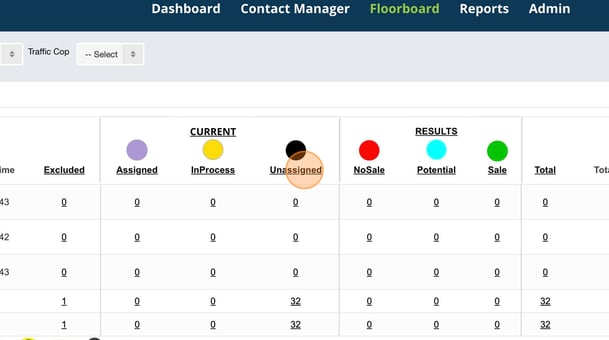
Click the "Unassigned" button under the "current" section of the floorboard
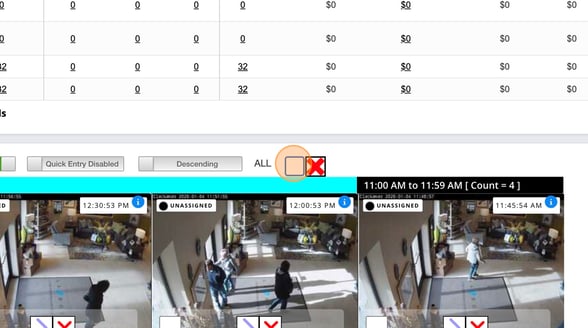
Click the "ALL" checkbox located above the photos
Give a reason for your mass exclude
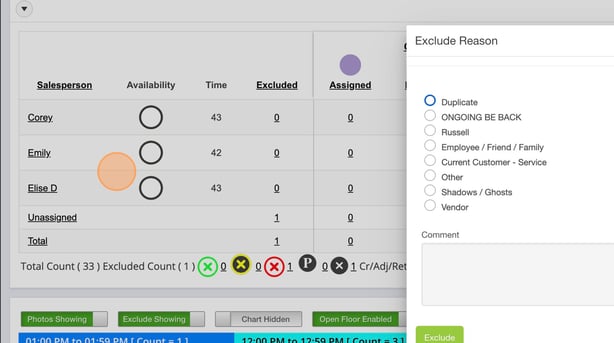
Click "Exclude"
![TW Blue Logo 230908a.png]](https://help.trakwell.ai/hs-fs/hubfs/TW%20Blue%20Logo%20230908a.png?height=14&name=TW%20Blue%20Logo%20230908a.png)
Click the "Unassigned" button under the "current" section of the floorboard
Click the "ALL" checkbox located above the photos
Give a reason for your mass exclude
Click "Exclude"